


 画像最適化
画像最適化文書をスキャンして作成された PDF は、多くの場合、白黒の文書をカラーでスキャンしたり、過度の解像度を使っているなど、スキャン設定が正しくないか最適でない状態で作成されます。 その結果、PDFのファイルサイズが不必要に大きくなったり、読みにくい文書になります。
このツールを使うと、PDFを最適化し、画像の解像度や色を減らし、視覚化や印刷品質を低下させない、小さなファイルサイズの文書に修正できます。 品質を下げたり、ファイルサイズを小さくしたい場合など、多くの状況があります。
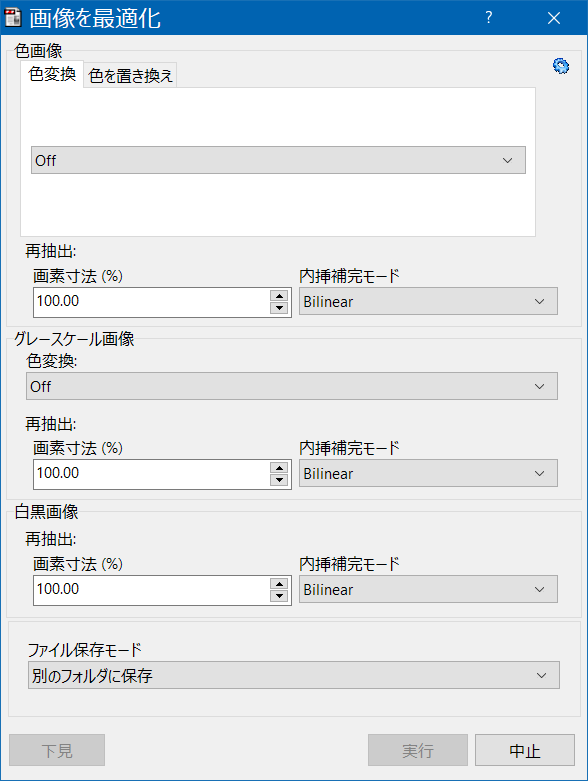
画像の最適化設定は、全ページの、すべての種類の画像に対して、または画像の種類ごとに定義することができます(例えば、カラー画像、グレースケール画像、および白黒画像に対して異なる最適化設定)。上の画面例は、このような最適化設定の詳細な指定方法を示しています。このモードは、右上の青い歯車アイコンボタンをクリックすると表示される、追加オプション・メニューで変更できます。
色変換は、カラー画像をグレースケールか白黒に変換するなど、色変換を実行するかどうかを指定するために使います。
再抽出操作は、画像の画素寸法をパーセンテージで変更する(つまり、画像の解像度を変更する)ために使います。例えば、1250 x 800画素の画像は、画素サイズを 80% に設定すると、1000 x 640画素の画像になります。再抽出操作では、補間を使って新しい画素を推定するため、補間モードセレクターで、使うアルゴリズムを指定します。
| Function name: | OptimizeImages |
| Options: | [] means optional parameter |
| [-ByColorType] | - The optimization parameters are specified by image color type. |
| [ConvertTo=] | - The image optimization method. If the -ByColorType parameter is specified, this command is specific to the optimization of color images only.
|
| [ResamplePercentage=] | - The percentage of image resample to apply. The images will be downsampled for valued less than 100 and upsampled for values above. If the -ByColorType parameter is specified, this command is specific to the optimization of color images only. |
| [InterpolationMode=] | - The interpolation method to apply when resampling the images. If the -ByColorType parameter is specified, this command is specific to the optimization of color images only.
|
| [ConvertGrayTo=] | - The image optimization method to use with grayscale images. Only used when the -ByColorType parameter is specified.
|
| [GrayResamplePercentage=] | - The percentage of image resample to apply when resampling grayscale images. Only used when the -ByColorType parameter is specified. |
| [GrayInterpolationMode=] | - The interpolation method to apply when resampling grayscale images. Only used when the -ByColorType parameter is specified. |
| [BWResamplePercentage=] | - The percentage of image resample to apply when resampling black and white images. Only used when the -ByColorType parameter is specified. |
| [BWInterpolationMode=] | - The interpolation method to apply when resampling black and white images. Only used when the -ByColorType parameter is specified. |
| [LossyCompressionQuality=] | - To specify the compression quality to apply when compressing the images with a lossy compression algorithm.
|
| [OutputPath=] | - Full path where to place the optimized files. If not specified, file source path will be used instead |
| [-CreateBackup] | - To backup rename the source PDF. |
| [-s] | - Silent mode. Run without showing the interface (only available for licensed users) |
| fileslist | - List of files to process with the script. Separate multiple files using the semicolon ";" char. Must be the last parameter |
| Examples: - Convert all images to grayscale "c:\Program Files\PDF-ShellTools\PDFShellTools.exe" OptimizeImages ConvertTo=Grayscale -s c:\PDFs\*.PDF - Convert color images to grayscale, and downsample black and white images to 75% "c:\Program Files\PDF-ShellTools\PDFShellTools.exe" OptimizeImages -ByColorType ConvertTo=Grayscale BWResamplePercentage=75 -s c:\PDFs\*.PDF |
|