


 ファイル添付
添付ファイルオプションを使うと、ユーザーは、PDFファイルの添付ファイルを開いたり、抽出したり、追加したり、削除したりできます。
ファイル添付は PDF文書の標準機能で、テキスト、オーディオ、画像、さらにはその他のPDFファイルなどのあらゆる種類のファイルをPDF文書に添付できます。
これらの添付ファイルは、開いたり、抽出したり、削除したりできます。
一般的なPDFリーダーは、通常、添付ファイルを開いたり抽出したりする機能はあります。
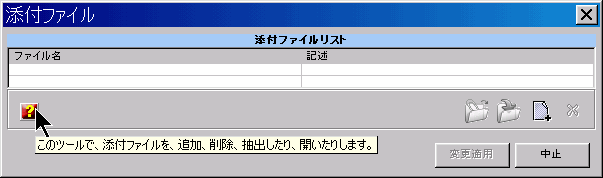

この機能は、PDFの作成に使われた元の文書、またはPDF の内容を補完する、その他のデータファイルを添付する場合に、非常に便利です。
「記述」列項目を編集して、添付ファイルを定義する内容のデータを入力できます。
「埋め込み」タブは、PDF文書に埋め込まれているのに、添付ファイルとしてリストされていないファイルにアクセスするために使われます。これは、文書で使われているサウンド、ビデオ、アニメーション、およびその他のファイル資源を抽出するのに役立ちます。
| Function name: | Attach |
| Options: | [] means optional parameter |
| attach= | The list of files to attach. Separate multiple files using ';' |
| [-CreateBackup] | - If specified create a backup file |
| [-s] | - Silent mode. Run without showing the interface (only available for licensed users) |
| fileslist | - List of PDF files where to attach. Separate files using the semicolon ";" char. Must be the last parameter |
| Example: "c:\Program Files\PDF-ShellTools\PDFShellTools.exe" Attach attach=c:\data\sample1.dat;c:\data\sample1.gif c:\somefolder\file1.PDF |
|
| Function name: | ListAttachments |
| OutFilename= | - Full path file name that will be created to return the list (UTF-8 encoded) of attached documents. |
| fileslist | - PDF file(s) from where to get the names of the attached documents; Separate files using the semicolon ";" char. Must be the last parameter. |
| Example: Rundll32 "c:\Program Files\PDF-ShellTools\PDFShellTools.dll",ListAttachments OutFilename=c:\temp\list.txt c:\PDFs\*.PDF |
|
| Function name: | ExtractAttachment |
| Name= | - The name (UTF-8 encoded) of the attachment to extract. |
| From= | - The PDF file from where to get the attachment. |
| To= | - The path where to place the extracted attachment. If a file name is provided, it will be used instead of the attachment name. |
| Example: Rundll32 "c:\Program Files\PDF-ShellTools\PDFShellTools.dll",ExtractAttachment Name=MyAttachment.txt From=c:\PDFs\PDF1.pdf To=c:\Temp\ |
|
| Function name: | DeleteAttachments |
| Options: | [] means optional parameter |
| Delete= | The list of names (UTF-8 encoded) of attachments to delete. Separate multiple names using using the semicolon ';' char. Wildcards supported. |
| [-CreateBackup] | - If specified, create a backup file |
| fileslist | - The list of PDF files from where to delete. Separate multiple files using the semicolon ";" char. Wildcards supported. Must be the last parameter |
| Example: Rundll32 "c:\Program Files\PDF-ShellTools\PDFShellTools.dll",DeleteAttachments delete=v*.doc -CreateBackup c:\somefolder\file1.PDF |
|