


 結合/ページの再編集
このツールは、対象のファイルを選択して、登録した上で、結合順序と対象ページを指定するだけで、これらのすべてのページで構成される、新しいPDF文書を作ることができます。
結合対象のファイルは、PDF だけでなく、 .bmp, .png, jpeg, .gif .tiff の、画像ファイルや、.cbr と .cbz の画像アーカイブも、対象にできます。
結合したいファイルは、結合順序と対象にしたいページを指定して、ツールに渡します。これだけで、これらのすべてのファイルと選択されたページを、指定した順序で結合して構成された、新しいPDF文書が、できあがります。
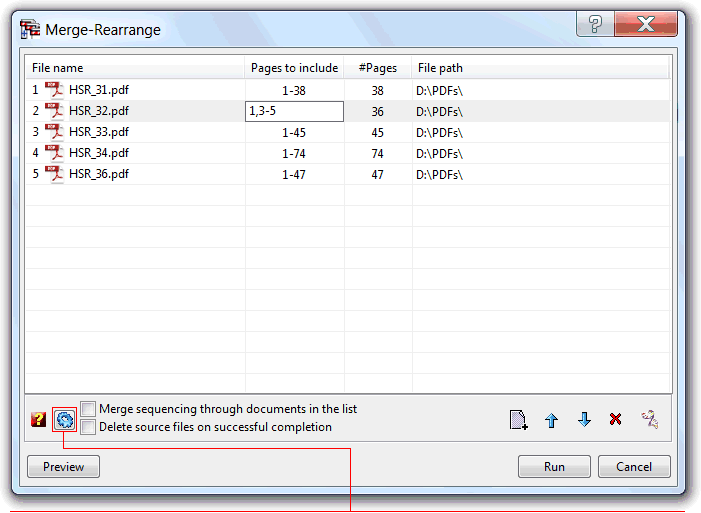

シェルで選択したファイルは、ツールのファイルリストに表示されます。
ツールバーの下のファイルリストは、ファイルの追加、マージ順序の変更、リストからのファイルの削除、または選択したファイルエントリの複製を行う機能を提供します。
(ページのソースとして、元のファイルを指定できるので、ページ順序を並び替える操作で役に立ちます。)
このリストは、シェルまたは互換性のあるドラッグアンド・ドロップ形式の別のソース・アプリケーションからの、ファイルのドラッグアンド・ドロップも受け入れます。
「対象文書のページ順に結合する」オプションは、すべての文書のすべての最初のページを初めに合併し、次にすべての2ページ目を加え…, 順番にすべてのページを合併するように、ツールを構成します。
奇数ページだけの文書と、偶数ページだけの文書の、2つの文書から、統合文書を作るときに役立ちます。
「成功して完了したらソースファイルを削除する」オプションは、操作の最後に、ツールが、マージされたすべてのソースファイルを削除するように指示します。新しい文書にマージした後、ソースファイルが不要になる場合に便利です。
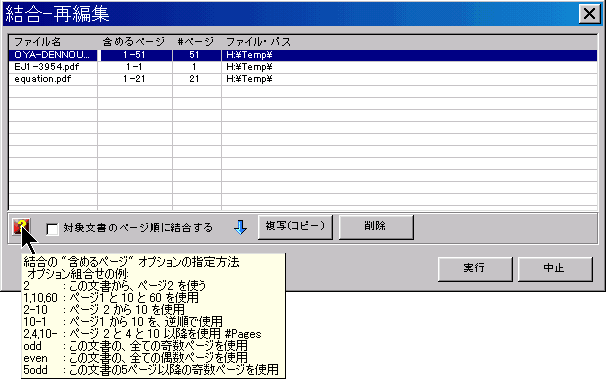
「含めるページ」の列を編集して、対象文書の中から、結合処理で使われるページを指定することができます。この指定方法は、画面の左下の「?」にマウス・ポインタを重ねることで、いつでも参照することができます。
| 関数名: | Merge |
| オプション: | [] は、任意のパラメータを意味します。 |
| [filename=] | - 結合結果のファイル名 |
| [PagesToInclude=] | - The list of pages to include, one for each of the documents to merge, specified accordingly with the rules shown in the above image. Separate each one using the semicolon ";" char. To use the same rule with all the documents, terminate the rule with an "*", e.g. PagesToInclude=odd* All the pages will be included, if this parameter is not specified. |
| [-IncludeLayers] | - To include page layers |
| [-GroupLayers] | - To group the layers by document |
| [-IncludeBookmarks] | - To include Bookmarks |
| [-GroupBookmarks] | - To group the bookmarks by document |
| [-BookmarkAll] | - Equivalent to the GUI "Bookmark 1st page on non-bookmarked documents" option, force the addition of a 1st page bookmark entry for all the merged documents that don't have any bookmark already defined, or all if the IncludeBookmarks option is not included. |
| [BookmarkName=] | - The bookmark name generation expression to use when the above BookmarkAll option is set. |
| [-AddBlankPage] | - To include a blank page at the end of each document with an odd number of pages, ensuring that each merged document starts in a new sheet. |
| [-DeleteSrcFiles] | - Sets the "Delete source files on successful completion" option |
| [-UseSourceDPI] | - Make the tool to scale the page to account the source file DPI resolution. Used only when converting image files (TIFF, PNG, GIF, etc.) to PDF pages. |
| [DefaultDPI=] | - A integer value to specify the default DPI's to use when the source image file misses this information. It defaults to 72 DPI's. |
| [-s] | - Silent mode. Run without showing the interface (only available for licensed users) |
| fileslist | - List of PDF files to merge; Separate files using the semicolon ";" char. Wildcards supported. Must be the last parameter |
| 例: "c:\Program Files\PDF-ShellTools\PDFShellTools.exe" Merge -IncludeLayers -GroupLayers -IncludeBookmarks filename=test.PDF PagesToInclude=1* c:\PDFs\*.PDF |
|