


 ページの挿入/追加
 目的のPDF文書の、既存のページの前や後など、指定された場所に、ページや文書を指し込むツールです。
対象は、PDFファイルだけでなく、.bmp, .png, .jpeg, .gif, .tiff 画像や、.cbr, .cbz 画像アーカイブも指定できます。
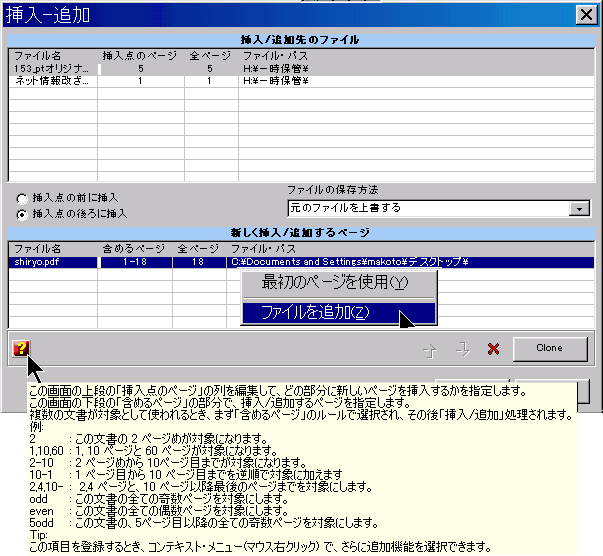
Windowsシェルで選択されたファイルは、ドキュメントを挿入したいと思う、挿入先のファイルで、上段に表示されます。
ツールを起動すると、先のドキュメントに指し込まれるページのファイルを選択・指定する画面が表示されるので、ファイルを指定します。すると、選択されたファイルが、下部のリストに表示されます。
下部のリストは、結合/ページの再編集ツールのように働いています。複数の文書を指定した場合には、前もって結合操作をします。そして、結果のページが、上段の文書に挿入されます。
リストは、シェルや、互換性のあるドラッグアンドドロップ形式の別のソースアプリケーションからのファイルのドラッグアンドドロップも受け入れます。
「挿入点のページ」の欄で、差し込み先のページを指定します。上段のコンテキスト・メニューを使って、すばやく一般的な差し込みポイントを指定することかできます。
挿入点のページの、前に挿入するか、後ろに挿入するかは、ラジオボタンで指定します。
「ファイルの保存方法」では、結果ファイルを作成するときの処理方法を選択します。元のファイルを上書きする、バックアップファイルを作る・作らない、また、別のフォルダーに作成するすることを選択できます。
「正常に完了したらソースファイルを削除する」オプションは、操作の最後に、挿入されたすべてのページのソースファイルを削除するようにツールに指示します。 挿入後にソースファイルが不要になった場合に便利です。
左下の「?」マークにマウス・ポインタを重ねると、ヒント画面が表示されて、操作方法と、使える 含めるページ ルールを参照できます。
| 関数名: | Insert |
| オプション: | [] は、任意のパラメータを意味します。 |
| [OutputPath=] | - Full path where to create the inserted/appended files. When specified, file save mode option is set to "Save in another folder" |
| [-CreateBackup] | - If specified sets the file save mode option to "Backup original files". |
| FilesToInsertAppend= | - List of files to insert or append; Separate files using the semicolon ";" char. Wildcards supported. |
| [InsertPoint=] | - To enter the insert point page number. |
| [-InsertBefore] | - Sets the "Insert before insertion point" option |
| [-IncludeLayers] | - To include page layers |
| [-GroupLayers] | - To group the layers by document |
| [-IncludeBookmarks] | - To include Bookmarks |
| [-GroupBookmarks] | - To group the bookmarks by document |
| [-BookmarkAll] | - Equivalent to the GUI "Bookmark 1st page on non-bookmarked documents" option, force the addition of a 1st page bookmark entry for all the merged documents that don't have any bookmark already defined, or all if the IncludeBookmarks option is not included. |
| [BookmarkName=] | - The bookmark name generation expression to use when the above BookmarkAll option is set. |
| [-AddBlankPage] | - To include a blank page at the end of each document with an odd number of pages, ensuring that each of the inserted documents starts in a new sheet. |
| [-KeepTimestamps] | - keep source timestamps (created, last modified) unchanged. |
| [-DeleteSrcFiles] | - Sets the "Delete source files on successful completion" option |
| [-UseSourceDPI] | - Make the tool to scale the page to account the source file DPI resolution. Used only when converting image files (TIFF, PNG, GIF, etc.) to PDF pages. |
| [DefaultDPI=] | - An integer value to specify the default DPI's to use when the source image file misses this information. It defaults to 72 DPI's. |
| [-s] | - Silent mode. Run without showing the interface (only available for licensed users) |
| fileslist | - PDF file, or list of PDF files, where to insert; Separate files using the semicolon ";" char. Must be the last parameter |
| 例: "c:\Program Files\PDF-ShellTools\PDFShellTools.exe" Insert OutputPath=C:\Temp\Processed FilesToInsertAppend=C:\Logo.png InsertPoint=1 -InsertBefore C:\tmp\*.PDF |
|