


格子レイアウト・エディタは、グリッド・レイアウトを、編集したり、新しく作るときに使います。
格子レイアウトは、格子に表示する列の組合せの規則に名前を付けたもので、格子レイアウト一覧から選択できます。
規則とは、データをどのように格子の上で表示するかを定め、どのメタデータ項目を見えるようにするかを定義し、項目の位置や、項目の表題や、項目のデータ型と、文字の位置決めや、動的に計算された項目、ファイル型の可視性、計算盤の上で示す計算の、定義です。
PDFEは、デフォルトで、4つのレイアウトを提供します。ユーザーは、さらに、この編集機能を使って、ユーザの文書管理ニーズにふさわしいメタデータを、カスタム格子レイアウトとして、作ることができます。
レイアウトを、目的によって使い分けると、同類や、異なる項目、メタデータを覆い隠すことで、格子プレゼンテーションが分析する形式に、ふさわしくなり、効率的に実行できる可能性が、広がります。
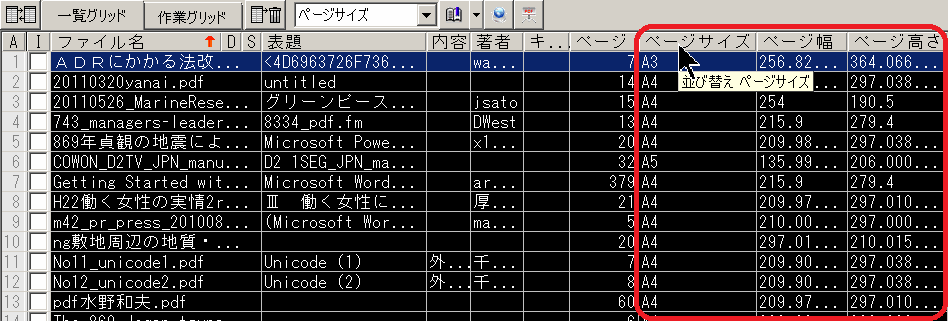
「グリッド・レイアウト」は、「編集」メニューで、あるいはグリッド・レイアウト一覧で「右クリック」して表示されるコンテキスト・メニューで、選択できます。
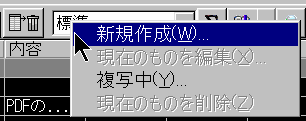
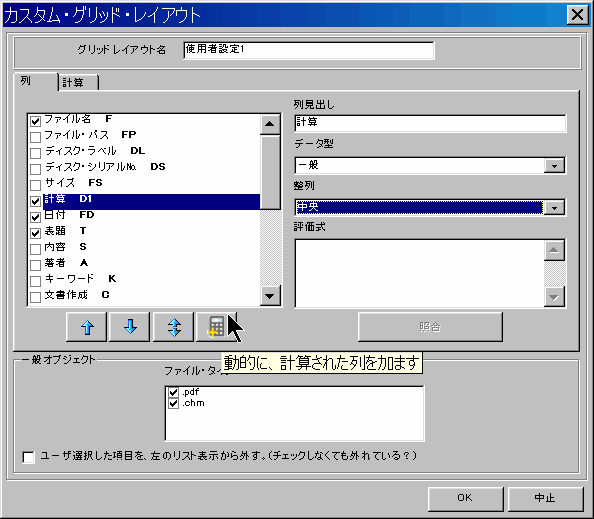
新しいグリッド・レイアウトを作成する場合、グリッド・レイアウト名の項目を使って、意味のある名前を与えることが重要です。分かりやすい名前だと、レイアウト一覧で選択するときに、便利です。
定義するために、項目タブ・シートを使います:
グリッド項目のこの型は、他の項目データを参照する計算式で定義されます。これは、引用したり計算したりできる、一つまたは複数の特定の数値があるとき、役に立ちます。この特定の格子レイアウトの、管理機能を強化します。この値は、格子項目に表示されて、この項目は、並び替えや、エクスポートできます。この項目データは、格子の上に表示されるだけです。格子を表示するたびに、動的に計算されるので、計算式が、時間とともに変わる変数を含んでいても、計算結果の値は、表示するたびに、自動で更新されます。
この項目の1つに使用できる代表例は、日数を計算するものです。これは、物理的なメタデータ項目の1つに日付の値を設定して、計算式に渡します。
あるいは、数値の値を示すために、他の物理的な、あるいは動的なグリッド項目から集められた、割合で影響する、あるいは別の型を含んでいる数値の計算です。
この計算式は、数値に対処することに限られません。テキストの操作も、可能で、他の項目データで集められるテキストを、見つけたり、引用したり、操作したり、表示したりする場合にも、用いることができます。
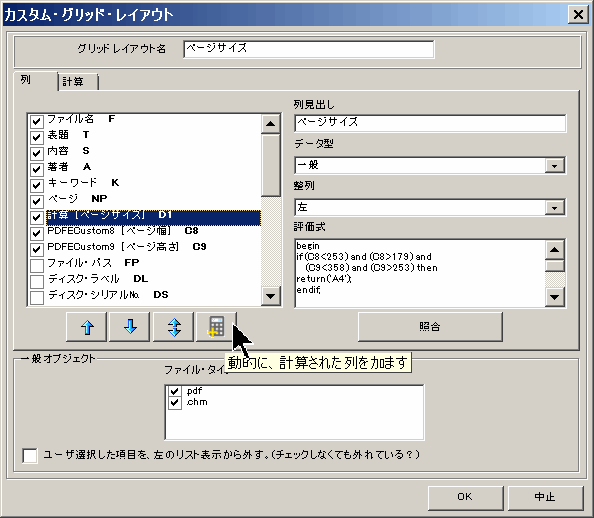
| 用紙種類 | 用紙サイズ(mm) | 用紙種類 | 用紙サイズ(mm) | |
| A1 | 841*594 | B1 | 1030*728 | |
| A2 | 594*420 | B2 | 728*515 | |
| A3 | 420*297 | B3 | 515*364 | |
| A4 | 297*210 | B4 | 364*257 | |
| A5 | 210*148 | B5 | 257*182 | |
| A6 | 148*105 | B6 | 182*128 | |
| A7 | 105*74 | B7 | 128*91 |
この例の計算式と、式の構文は、下記を参照下さい。
計算格子レイアウト・エディタ・タブ・シートで表示される、計算パネルは、格子レイアウトを設定する、もう一つの動的な計算です。
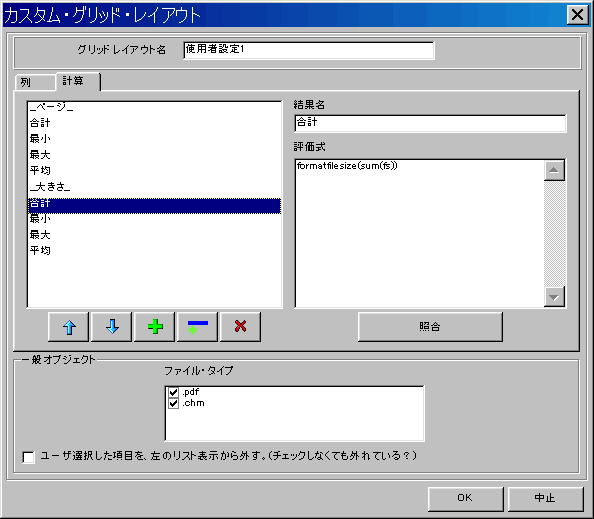
このパネルは、表示されているグリッド・レイアウトで、このパネルが設定されている場合に見えるもので、グリッド・ツールバー・ボタンをクリックすると、表示されます。
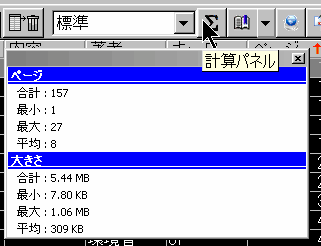
これは、特定の項目の、すべての値を含む計算結果を表示すために、使うことができます。 合計や、他の統計関数結果を示すのに有用です。 上の画面は、この計算パネル(この例は、標準の格子レイアウトに、デフォルトではめ込まれています)の1例で、パネルの使い方を例証しています。
このパネルの上で値を定めるには、新しいエントリを加えて、その名前をセットして、計算できる式を定める必要があります。値を、より分かりやすく表示するために、グループ化して、パネルにヘッダー項目を加えることができます。
このパネルで使うことができる例、評価式構文、および関数は、下の説明を参照下さい。
標準的な格子レイアウト(デフォルト計算パネルで設定済み)は、簡単にコピーをつくることができます。
「編集」→「グリッド・レイアウト」→「現在のものを複写(複写中)」、そして、コピーしれたレイアウトを編集できるので、この計算パネルがどのように設定されているを見て調べることができます。
コメントは、コンパイラによって無視されます。コメントは、以下の2つの、どちらかの方法で作成します:
左のブレースと右のブレースの間のテキストは、コメントとして扱われます。
二重のスラッシュから、行末までの間のテキストは、コメントとして扱われます。
式によって、データの値は、数値型か文字型のいずれかになります。
比較演算子 (=, <> ,>= , <= , >, <) と追加で、
式評価器は、最初にオペランドを数値に換算しようとします。そして、これができなければ、文字列とします。
例えば、 "123" + 321 は、 444 を返します。しかし、"x123" + 321 の結果は、"x123321" になります。
数値のリテラル(整数と実数)は、共通の十進記数法で表わすことができます。ドル記号接頭辞は16進法の数字を示します。$ の直後の 16 進法の数字は、0..9 のうちの 1 つでなければなりません。 - 例 $0AF ($AF ではない)
文字列の値は、二重か一重の、どちらかの引用符で囲みます。2つの連続したアポストロフィまたは、同じ引用符付きの文字列の二重引用符は、対応する一文字を意味します。特別なASCIIコードでシンボルを指定するために、対応する整数定数の前に、# シンボルを使ってください。
ブーリアン型はありません。C言語のように、評価する人が、0 値を False と、そして、ゼロ以外を True として扱います。
日付と時間は、浮動小数点の値として表されます。
数値演算子: +, - , * , /, % (or mod), \ (or div), ^ (raise to a power).
比較演算子: =, <>, >, <, >=, <=.
論理演算子: & (or and), | (or or), xor, ! (or not).
連結演算子: @.
加算と連結の操作の違いは、@ は、常に、その操作対象を文字列とみなします。
例:
"123" @ 321 の結果は "123321" (対比:"123" + 321 の結果は 444)
格子の列や、メタデータ項目のデータを参照するときは、その定義された定数名を使用います。
F = Filename, FP = File path, DL = Disk label, DS= Disk Serial, FS = File size, FD = File date, T = Title, S = Subject, A = Author, K = Keywords, C = Creator, P = Producer, CD = Creation date, MD = Modification date, NP = Number of document pages, V = File format version, E = Security level, AN = Archive name (for compressed archives), C# = Custom field, where # must be replaced by its index, e.g. C1, C2,.., D# = Dynamic calculated column, # must be replaced by its index, D1, D2. Circular references must be avoided or the program will lock.
動的に計算された列表現を評価する場合、この列参照定数名は、計算されている現在行の文字列の内容を表わします。
なので、動的に計算する表現 T 定数が入力されると、
行 0 で式の結果を計算する時、それは、行 0 のタイトル列の内容と置き換えられます。そして行 1 で式の結果を計算する場合、行 1 のタイトル内容によって、置き換えられます。以下同様です。
「計算」表現を評価するとき、この列参照定数名は、その列の値の配列の全てを意味します。
変数引数リストとして関数に渡すとき、下の(例: Min(NP) )統計関数を参照してください。
また、単一の引数操作で使用する時は、行 0 の値となります。例えば、NP*15
注: すべてのメタデータ項目は、その恒常的な名前によって参照することができます。格子レイアウト上で、見えない状態になっている項目にセットされていても、参照できます。
格子データにアクセスする関数:
grid.numrows - returns the number of filled rows on active grid.
grid.cell(colname,rowindex) - Use it to access the string within a particular Column/Row intersection define by the ColName and RowIndex respectively. ColName is the string name of the column coordinate of the cell, and RowIndex is the row coordinate of the cell. The first row is row zero.
数値関数:
Trigonometric, hyperbolic and invert functions:
sin(x), cos(x), tan(x), asin(x), acos(x), atan(x), cosh(x), sinh(x), tanh(x), asinh(x), acosh(x), atanh(x)
Exponential and logarithmical functions:
log(x), lg(x) (log base 10), exp(x), sqrt(x)
Integer and factional part of number: int, frac
Absolute value: abs
Sign of a number: sign
Random value and initialization of the random number generator: rnd(x), randomize
統計関数(すべての統計関数は、変数引数リストをとります):
max(x1,x2,...) - maximum of passed values,
min(x1,x2,...) - minimum of passed values,
avg(x1,x2,...) - average value,
stddev(x1,x2,...) - standard deviation (unbiased),
stddevp(x1,x2,...) - standard deviation (biased),
sum(x1,x2,...) - sum of passed values,
sumofsquares(x1,x2,…) - sum of passed values squares
count(x1,x2,...) - count of passed values
variance(x1,x2,...) - variance (unbiased)
variancep(x1,x2,...) - variance (biased)
論理関数:
iff(e,x,y) - checks the expression passed as e and returns x if it evaluates to true, or y if it evaluates to false.
isnumber(x) - returns true if x is number.
文字列関数:
chr(x) - returns character with ASCII code x.
length(s) - length of the string.
trim(s), trimleft(s), trimright(s) - trims leading and/or trailing spaces and control characters from a string
uppercase(s), lowercase(s) - converts an ASCII string to upper(lower)case.
midstr(s,fron,len), leftstr(s,len), rightstr(s,len) - returns the substring of a specified length that appears at the specified position (start, end) of a string.
ReverseStr(s) - returns the string specified by s with the characters in reverse order.
pos(t, s) - returns the index value of the first character of t that occurs in s.
code(s) - returns then returns ASCII code of first character of string s.
stringofchar(c, count) - returns a string with a specified number of repeating characters.
concat(s1,s2,...) - concatenates an arbitrary number of strings.
日付と時間の関数:
date(s) - converts string to numeric date-time value.
now - returns the current date and time.
dayofweek(d) - returns the day of the week represented by a value d. Returns a value between 1 and 7, where 1 indicates Monday and 7 indicates Sunday.
year(d), month(d), day(d), hour(d), minute(d), second(d), millisecond(d) - returns respective part of date-time value d.
isleapYear(n) - indicates whether a specified year n is a leap year.
encodedate(year, month, day) - returns a date-time value that represents a specified year, month and day.
daysbetween(now, then) - returns a double type value representing the difference, in days, between two DateTime values. DaysBetween counts only whole days. Thus, DaysBetween reports the difference between Dec 31, 1999 11:59 PM and Jan 1, 2000 11:58 PM as 0 because the difference is one minute short of an entire day.
dayspan(now, then) - returns a double type value representing the difference, in days, between two Date values. Unlike the DaysBetween function, which only counts whole days, DaySpan reports incomplete days as a fraction of an entire day.
書式設定関数:
format(s,x) - formats a floating point value x using the format string given by s. Uses the same format string as format Delphi FormatFloat function.
formatf(s,x) - formats a floating point value x using the format string given by s. Uses the same format string as format Delphi Format function.
formatdate(s,d) - formats a date-time value d using the format string given by s. Uses the same format string as format Delphi FormatDateTime function.
FormatFileSize(x) - formats a integer value representing a file size in bytes to human readable format.
変数
There are two functions to define variables:
define("name", value) and defines("name1", "name2", "name3", ...).
Instead of defines() you can use the following syntax:
var "name1", "name2", "name3", … end.
To get/set value of variable use functions:
get("name") and set("name", value).
In place of get("name") you can use $name, and in place of set("name", value) - $name := value.
As set and get are functions, you can use an expression to specify variable name. 対応する他の構文 is $(expression).
There are two special functions for variable incrementing and decrementing:
inc('name') and dec('name'). Instead of function call you can use next syntax: $name++ and $name--.
Arrays support is not provided, but you can work with variables named 'n1', 'n2', 'n3' ... as with array. To reference element of such "array" use expression $('arrayname'@index) or $arrayname[index] for example $n[$i]. Two dimensional arrays should consist of variables 'x1_1', 'x1_2', 'x2_1' and so on. To reference element: $x[$i,$j] (equal to $('x'@$i@'_'@$j)). You can define multidimensional arrays in the same way.
命令文
命令文として扱われる、5 つの特別の関数があります。これらの関数は、実際の関数ではありません。これらは、特別のバイト・コードの中でコンパイルされます。
Return 手続き:
return(value) - stops evaluation and return value as a result of computation.
Compound 命令文:
block(p1,p2,p3,…) - returns value of last argument.
あらかじめ定義された定数:
begin = block(
end = )
対応する他の構文:
begin p1; p2; p3; … end.
If 命令文
condition(expression, p1, p2) - returns p1 or p2 depending of expression value.
あらかじめ定義された定数:
if = condition(
then = ,begin(
else = ),begin(
endd = ))
endif = ),0)
対応する他の構文:
if expression then p1 else p2 endd or
if expression then p1 endif.
Pay attention that in first case statement should ends with endd as in fact if expression then p1 else p2 endd is equal to condition(expression, block(p1), block(p2)).
Difference between condition and iff functions is that iff computes both its branches and condition only one. For example
iff(1,message('1','1',0),message('0','0',0)) shows two message boxes and
if 1; message('1','1',0); message('0','0',0) end shows only first message box.
While 命令文
loop(expression, p)
あらかじめ定義された定数:
while = loop(
do = ,begin(
wend = ))
対応する他の構文:
while expression do p wend.
Repeat 命令文
till(p, expression)
あらかじめ定義された定数:
repeat = till(begin(
until = ),
対応する他の構文:
repeat p until expression end.
For 命令文
series(initialization, condition, increment, p)
あらかじめ定義された定数:
for = series(
next = ))
対応する他の構文:
for initialization; condition; increment do p next
For 命令文は、C の反復ループと同じです。例:
for $i := 1; $i <= 10; $i++ do $x[$i] := $i; next
全てのループ関数は、行われた反復数を返します。
アクティブな格子の中の複数ファイルが占めている、バイトの総数を示す、計算表現
FormatFileSize(Sum(fs))
アクティブな格子の中で、最も小さなファイルが占めている、バイト数を示す計算表現
FormatFileSize(Min(fs))
ページ数が、0ページの、最初のファイルについて、その列とファイル名を示す、計算表現
begin
var 'i','n' end;
$n:=grid.numrows;
for $i:=0;$i<$n; $i++ do
if grid.cell(np,$i)=0 then
return($i+1+#32+grid.cell(f,$i)+#32);
endif;
next;
return('-');
end
数値の値を、動的に計算する列表現(あつらえの項目 1 は、あつらえの項目 2 の百分率を、反映します。)
C1*(1+C2/100)
ファイルの、修正日と作成日の間の日数を返す、動的に計算された列表現
DaysBetween(date(md),date(cd))
ファイル拡張子を返す、動的に計算された列表現。ファイル形式(zip, rar, pdf, chm, ...)でソートするときに有効です。
begin
var 'i','s' end;
$s:=an;
if $s='' then
$s:=f;
endif;
$i:=pos('.',reversestr($s));
if $i>0 then
return(lowercase(rightstr($s,$i-1)));
else
return('');
endd;
end