


このシェル拡張ツールを使うと、PDFファイルの情報が、tool tipバルーン(マウスポインタをファイルに重ねたときに現れる、黄色いポップアップ小画面)で表示されるようになります。このポップアップ画面は、エクスプローラーや、ファイルを開いたり、保存したりする画面など、フォルダを操作する全てのウインドウ・シェルで表示できます。
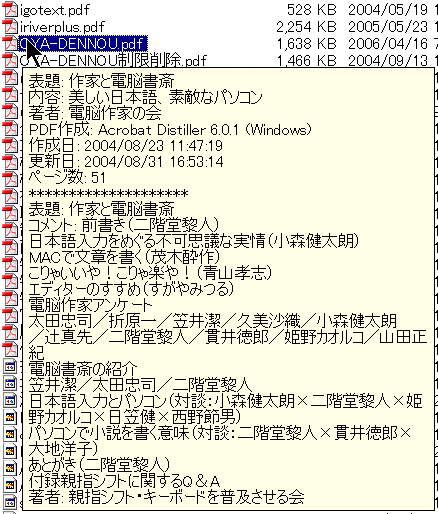
PDF ファイルにマウスポインタを重ねたときに表示される項目は、以下のものです:
- PDFファイル・メタデータの標準項目:
表題、内容、著者、キーワード、作成者、制作者、作成日、更新日 - ファイル構成情報項目:
ページ数、PDFバージョン、添付ファイルリスト、セキュリティ制限 - ファイルのシステム情報項目:
ファイル・サイズ、ファイル作成日付、更新日付 - 概要メタ・データ項目
ツールの環境設定で、すべての表示可能な項目から、InfoTipバルーンで表示させる項目を選択することができます。
マウス・ポインタを上に持っていったとき、項目で含まれている表示対象だけが、InfoTipバルーンで、ポップアップ表示されます。
このコマンド・ライン関数で、指定したPDFファイルのメタ・データ項目を、 .csv (コンマ区切りファイル形式)で、出力できます。
| 関数名: | ExportMetadata |
| オプション: | [] は、オプション・パラメータを意味します。 |
| [ExportFields=] | - 出力するメタデータ項目のリスト。CSV(コンマ区切り) の項目要素は、標準の項目名で構成されます:
- Title, Subject, Author, Keywords, Creator, Producer, CreationDate, ModDatePlus, the extra fields: - FileDate, FileSize, PDFVersion, PDFSecurity, PDFNPagesAnd any custom field name, as, for example, the ones produced by the Outlook email PDF archival Acrobat functionality: - MailSubject, MailTo, MailCc, MailDate, ...To reference a custom defined field, its label should be used as the field name. If the passed named is not defined in the list of custom fields, it is assumed as being a standard PDF custom field. Notes: - Fields names are cAsE sensitive. - The trial version exports only standard fields. - If this parameter is not provided, the function will export all the standard fields, plus all the user defined custom ones. |
| [-UTF8Encode] | - Exported data will be UTF-8 encoded. |
| [OutFilename=] | - Full path and file name of the .csv file to export to. If not specified, output will be sent to the Win32 console, if available. |
| FilesList | - List of PDF files, full path and name, to collect the metadata from. Separate individual files using the semicolon ";" char. Must be the last parameter. 注意: - 試供版は、最初の10個までのファイルしか、処理できないように、制限されています。 |
| 例: "c:\Program Files\PDF-ShellTools\PDFShellTools.exe" ExportMetadata ExportFields=Title,Subject,Author,PDFNPages OutFilename=C:\Temp\PDFMetadata.csv c:\Somefolder\*.PDF |
|